RAG : Retrieval-Augmented Generation
Hey everyone, As you guys know recently I started learning about AI/ML in order to become an AI engineer and so today I’ll be sharing what I learned about RAG in hinglish.
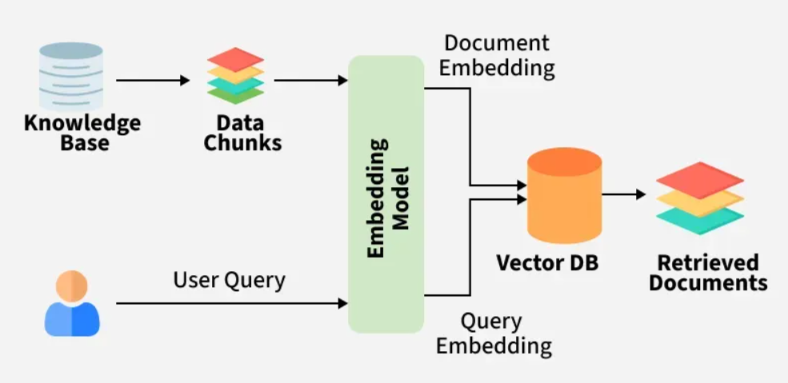
Introduction
So sabse pehle 1st chiz jo humko karni chaiye wo hai ek environment banana taki jo bhi libraries hum download kar rahe hai or jis bhi version ki kar rahe hai hamara code usko hi use kare.
Uske baad hi humko koi bhi code ya kaam continue karna chaiye and the best way to manage environment in my opinion is using uv. uv use karke hum environment create kar sakte hai and isko set karna bhi kafi asan h.
So you can create environment using:
uv venv - for creating environment
source .venv/bin/activate (Mac/Linux) or .\.venv\Scripts\activate for activating that environment
Make sure to perform these on the same directory where you are working
and uske baad you can just perform uv pip install -r requirements.txt where requirements.txt consists of all relevant libraries which are required. Incase tum koi library bhul gye you can just add it using uv add <library-name>
Code
from pathlib import Path
from langchain_community.document_loaders import PyPDFLoader
from langchain_text_splitters import RecursiveCharacterTextSplitter
from langchain_huggingface import HuggingFaceEmbeddings
from langchain_chroma import Chroma
from langchain_openai import ChatOpenAI
import os

# Load all PDFs
docs = []
for pdf in Path(".").rglob("*.pdf"):
    pages = PyPDFLoader(str(pdf)).load()
    for p in pages:
        p.metadata["source"] = pdf.name
    docs.extend(pages)

print(f"Loaded {len(docs)} pages")

# Split into chunks
chunks = RecursiveCharacterTextSplitter(
    chunk_size=1000,
    chunk_overlap=200
).split_documents(docs)

print(f"Created {len(chunks)} chunks")

# Embeddings + Vector Store
embedding_model = HuggingFaceEmbeddings(
    model_name="sentence-transformers/all-MiniLM-L6-v2"
)

vectorstore = Chroma(
    collection_name="pdf_chatbot",
    embedding_function=embedding_model
)

vectorstore.add_documents(chunks)

# DeepSeek
os.environ["DEEPSEEK_API_KEY"] = "xxxx"

llm = ChatOpenAI(
    api_key=os.environ["DEEPSEEK_API_KEY"],
    base_url="https://api.deepseek.com",
    model="deepseek-chat",
    temperature=0.1,
)

retriever = vectorstore.as_retriever(search_kwargs={"k": 3})

def rag(query):
    docs = retriever.invoke(query)
    context = "\n\n".join(doc.page_content for doc in docs)
    return llm.invoke(
        f"""Answer only using the context below.

Context:
{context}

Question: {query}
Answer:"""
    ).content
Functioning
Ab me code ke blocks ko paragraph by paragraph show karte hue explain karunga also mene deepseek use kara hai but you can use any other model by tweaking code a little bit which I will also explain:
import
from pathlib import Path
from langchain_community.document_loaders import PyPDFLoader
from langchain_text_splitters import RecursiveCharacterTextSplitter
from langchain_huggingface import HuggingFaceEmbeddings
from langchain_chroma import Chroma
from langchain_openai import ChatOpenAI
import os
pathlib ka use hai path ko declare karna ki konsi file kahape hai. langchain_community ka use is it contains third-party integrations that implement the base interfaces defined in LangChain Core, making them ready-to-use in any LangChain. Is library me kafi kaam ki chize hai and jo hum use karenge wo hai PyPDFLoader jiska kaam hai pdf ka content read karna. Fir ata hai hamara langchain_text_splitters library jisme se hum RecursiveCharacterTextSplitter import karte hai ab iska kaam hota hai text ko chunks me divide karna - “RecursiveCharacterTextSplitter is the standard text-chunking method in LangChain. It takes a list of separators (defaulting to [”\n\n“, “\n”, “ “, “”]) and recursively slices text, prioritizing larger structural boundaries like paragraphs and sentences before falling back to words or characters to preserve semantic“ ye nearest separator ko dekhta hai and us hisab se jo input value doge (like chunk_size=500) usi hisab se chunks me content ko divide karega. HuggingFaceEmbeddings hum use karenge text ko vectors / embeddings me convert karne ke lie jo semantic search and similiarity comparison me use hote hai. Ye hamari query and database ke lie jo content hai undono ko hi embeddings me convert karta hai.
Load all PDFs
docs = []
for pdf in Path(".").rglob("*.pdf"):
    pages = PyPDFLoader(str(pdf)).load()
    for p in pages:
        p.metadata["source"] = pdf.name
    docs.extend(pages)

print(f"Loaded {len(docs)} pages")
As we can see in the code, sabse pehle humne docs naam ki ek empty list banayi hai. Is list ka use sabhi PDFs se load hone wale page-level Document objects ko ek jagah store karne ke liye hoga.
docs = []
Uske baad humne:
for pdf in Path(".").rglob("*.pdf"):
use kiya hai. Yahan Path(".") current folder ko represent karta hai, aur rglob("*.pdf") current folder ke saath-saath uske andar present subfolders mein bhi recursively sabhi .pdf files search karta hai. Har iteration mein ek PDF file ka path pdf variable mein store hota hai.
Next line mein:
pages = PyPDFLoader(str(pdf)).load()
pdf path ko str() ki help se string format mein convert karke PyPDFLoader ko diya jaata hai. PyPDFLoader PDF ko load aur parse karta hai, aur uske content ko LangChain Document objects ki list ke form mein return karta hai. Default page-based loading mein PDF ka har page ek separate Document object hota hai.
For example, agar ek PDF mein 10 pages hain, to pages list mein approximately 10 Document objects honge. Har Document object ke andar mainly page ka text page_content mein aur us page ki additional information metadata mein present hoti hai.
Uske baad hum har loaded page par loop chala rahe hain:
for p in pages:
    p.metadata["source"] = pdf.name
Yahan p ek page ka Document object hai. Hum us page ke metadata ke andar source key set kar rahe hain. pdf.name sirf PDF ka filename return karta hai, jaise:
machine_learning.pdf
Iska benefit ye hai ki baad mein jab koi relevant page retrieve hoga, to hum identify kar sakenge ki wo content kis PDF file se aaya hai.
Next:
docs.extend(pages)
extend() ka use pages list ke sabhi page-level Document objects ko individually main docs list mein add karne ke liye hota hai.
For example:
pages = [page1, page2, page3]
to docs.extend(pages) ke baad ye teenon pages individually docs list mein add ho jaayenge.
Ye process folder mein present har PDF ke liye repeat hota hai. Isliye end mein docs list mein sabhi PDFs ke loaded pages ke Document objects present honge.
Finally:
print(f"Loaded {len(docs)} pages")
len(docs) main docs list mein present total page-level Document objects count karta hai. Isliye ye statement batata hai ki sabhi PDFs ko mila kar total kitne pages load hue hain.
For example, agar folder mein do PDFs hain:
PDF 1 = 10 pages
PDF 2 = 15 pages

to output hoga:
Loaded 25 pages
Splitting in chunks
chunks = RecursiveCharacterTextSplitter(
    chunk_size=1000,
    chunk_overlap=200
).split_documents(docs)

print(f"Created {len(chunks)} chunks")
docs list mein hamari PDFs ke page-level Document objects present hain. split_documents(docs) in sabhi documents ke page_content ko smaller text chunks mein divide karta hai. Har resulting chunk bhi ek LangChain Document object hota hai. Yaha chunk_size=1000 ka matlab hai har chunk ko approx. max 1000 chars ke andar rakhne ki koshish karna. Default configuration mein length characters ke basis par calculate hoti hai. Har chunk ka exactly 1000 characters ka hona necessary nahi hai, kyunki splitter paragraphs, newlines aur spaces jaise separators par text ko split karne ki koshish karta hai. Fir ata hai chunk_overlap=200 jiska matlab hai ki consecutive chunks ke beech approximately 200 characters ka common text rakha jaayega.
Example:
Chunk 1: characters 1–1000
Chunk 2: characters 801–1800
split_documents(docs) original documents ke metadata ko resulting chunks mein retain karta hai. Isliye agar kisi page ke metadata mein source PDF ka naam present tha:
p.metadata["source"] = pdf.name
to us page se create hone wale chunks ke metadata mein bhi source information available rahegi.
Conceptually, process kuch aisa hoga:
PDF
 └── Page Document
      ├── Chunk Document 1
      ├── Chunk Document 2
      └── Chunk Document 3
Finally:
print(f"Created {len(chunks)} chunks")
len(chunks) calculate karta hai ki sabhi page documents ko split karne ke baad total kitne chunk-level Document objects create hue hain.